Regenerate your Shopify home page with AI — using your own theme, not a generic template
Obsess AI reads your live theme sections, brand profile, and catalog to compose a full home page — hero, featured collections, brand story, testimonials, CTAs. Nothing goes live until you approve a staged preview, and every publish takes an automatic backup first so you can roll back in one click.
?view= — live storefront untouchedA home page built from your theme, not a page-builder canvas
Most AI website builders render their output in a proprietary canvas that locks you out of your theme. Obsess AI does the opposite — it reads what your theme can already do and composes within it. Read the full guide on Shopify homepage best practices for the principles this generator applies automatically.
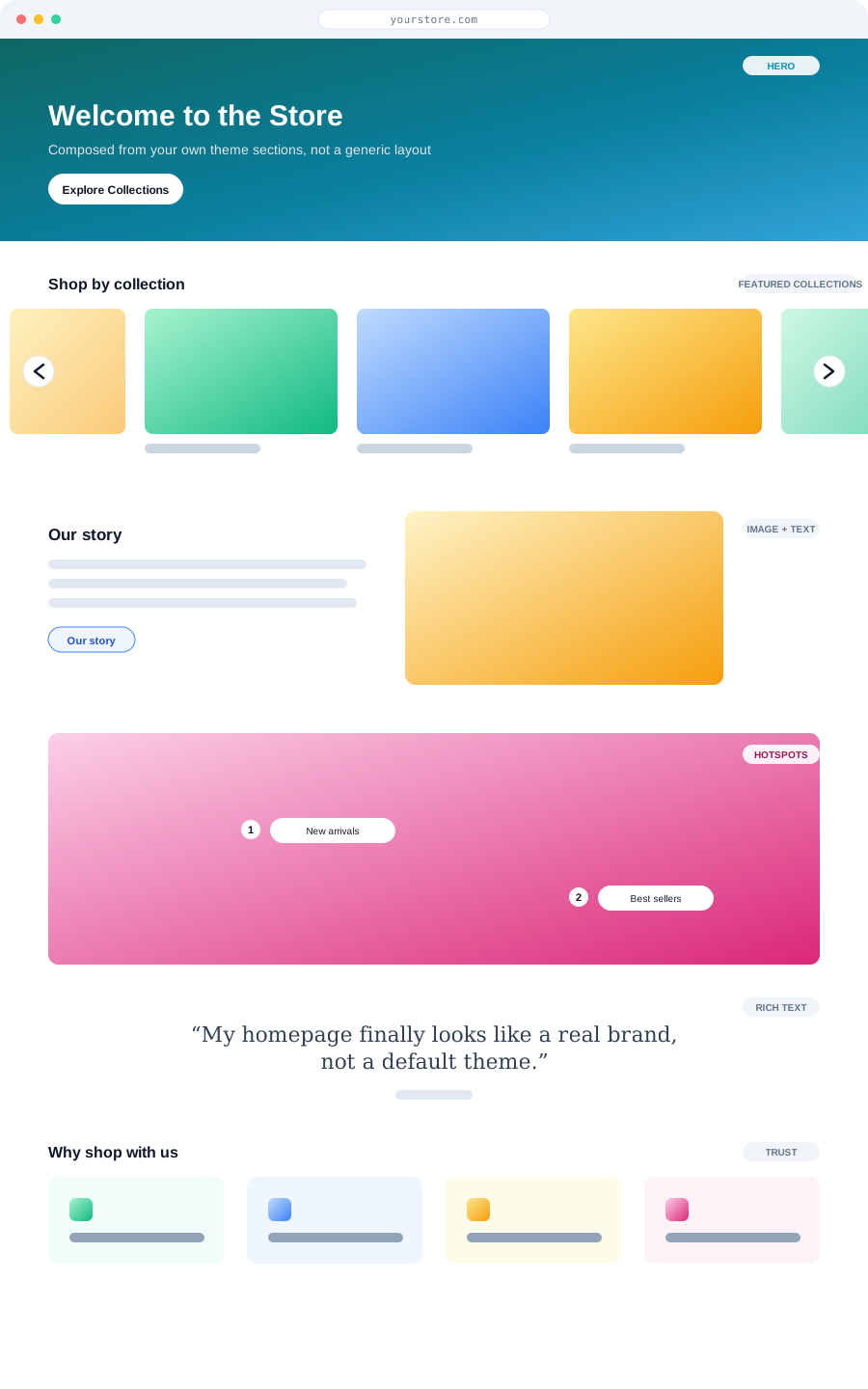
Theme-native rendering
The new home page is composed entirely from your own installed theme sections — the exact ones your theme already knows how to render. Nothing is drawn through a proprietary page-builder canvas or an iframe overlay.
- Reads your live theme section catalog before generating anything
- Output is pixel-faithful to your existing theme
- Stays fully editable afterward in Shopify’s native theme customizer
Fully LLM-driven section selection
There is no fixed home page template. The AI reads your brand dossier — voice, colors, USPs, target market — and your product catalog, then decides what a home page for this specific store should contain.
- Hero banner, featured collections, brand story, testimonials, email signup, FAQ — chosen, not hardcoded
- Featured collections curated from bestsellers and complementary categories
- Never places a raw product grid on the home page — that stays collection-page-only
Grounded in your real catalog and brand profile
Copy, colors, and product selections all come from your store’s actual brand voice profile and live product data, not a generic placeholder store used to demo the tool.
- Brand voice, color palette, and USPs pulled from your store profile
- Featured products and collections drawn from your live catalog
- No generic stock copy — every section is written for your store
Staged preview before anything is live
Generation never touches your live storefront. The proposed home page is composed and rendered at a staged preview URL first, so you can review the real thing before a single visitor sees it.
- Full outline and composed copy/images previewable at a `?view=` URL
- Your current home page keeps serving live traffic during review
- Nothing publishes until you explicitly approve it
Automatic backup before publish
The moment you publish, the system snapshots your current home page first, then swaps in the new one. The backup step is mandatory, not optional — it happens before the swap, every time.
- Pre-swap snapshot taken automatically on every publish
- No configuration required — the safety step cannot be skipped
- Snapshot captures the exact prior home page, not an approximation
One-click rollback
If the new home page is not what you wanted, restore the exact prior version with a single click. No re-editing in the theme customizer, no digging through Shopify’s version history.
- Instant restore of the exact previous home page
- Available any time after publish, not just immediately after
- The undo button most AI redesign tools do not offer
How a home page regeneration actually runs
The safety story is not a footnote — it is built into the pipeline. Here is the six-stage process, from reading your theme to the backup that makes rollback possible.
Read the live theme section catalog
Before generating anything, Obsess AI reads your installed Shopify theme and builds a map of the sections it can actually render — hero banners, collection lists, rich text, testimonials, email signup, FAQ, and more. Only sections your theme supports are ever candidates for the new home page.
Read your brand dossier and catalog
Your store’s brand voice, color palette, USPs, and target market are pulled from your profile. Bestsellers and complementary categories are pulled from your live product catalog. This is the material the AI has to work with — nothing generic, nothing templated.
LLM composes the outline
The AI decides which sections this specific home page needs and in what order — a hero, featured collections curated from bestsellers, a brand story block, testimonials, an email capture, an FAQ — using only sections the theme can render. No fixed page shape, and never a raw product grid on the home page.
Copy and images generated per section
Each chosen section gets copy written in your brand voice and imagery suited to the section type, pulling product photography from your catalog where relevant. The result reads like it was written for this store, not filled into a template.
Staged preview, nothing live yet
The composed home page is rendered at a staged preview URL. Your live storefront keeps serving the current home page untouched while you review the new one end to end.
Backup, then publish
When you approve, the system takes an automatic snapshot of your current home page first, then swaps in the new one. Because the backup happens before the swap, a one-click rollback to the exact prior home page is available at any time afterward.
The three screens that matter
From a merchant’s point of view, regenerating a home page comes down to three moments: start from the Pages hub, review a staged preview, and publish with a backup already in place.
The Pages hub
A singleton Home page card shows a live thumbnail of your current home page alongside a "Redesign with AI" action. It is the single place to see what is live and start a regeneration — no hunting through the theme editor to find where the home page lives.
Generate to staged preview
Starting a regeneration kicks off the outline-and-compose pipeline. The AI proposes an outline and writes the copy and images using only your real theme sections. Nothing is live yet — the result is previewable at a staged URL for as long as you need to review it.
Publish with automatic backup
Publishing snapshots your current home page first, then swaps in the new one. A "restore my previous home page" rollback is available afterward with one click, so approving a new design is never a one-way decision.
Who this is built for
Anyone who wants a professional home page without hiring a designer or wrestling with the theme customizer — and who wants the confidence that a bad AI swap cannot become permanent.
Shopify store owners
Small teams (1–50 employees) who want a professional, on-brand home page without hiring a designer or learning the theme editor’s section-and-block model from scratch.
Ecommerce managers
Operators who need to refresh the home page around a season, a new collection, or a repositioning — without opening a project with an agency every time.
Agencies managing multiple stores
Teams who want a fast first pass at a home page redesign across client stores, grounded in each store’s real theme and catalog rather than a one-size-fits-all template.
Connected to the rest of the platform
The home page generator shares the same brand voice profile and catalog graph as product enhancements and blog generation, so the home page sounds like the same store as everything else Obsess AI writes.
Brand voice profile
Tone, vocabulary, and formatting habits learned from your store are applied to every generated section, from the hero headline to the brand story block.
Catalog graph
Bestsellers and complementary categories used to curate featured collections come from the same live product data your storefront reads.
Product and lifestyle imagery
Section imagery is composed using your existing product photography where relevant, keeping visuals consistent with the rest of your store.
Staged preview infrastructure
The same `?view=` staging mechanism used elsewhere in Obsess AI ensures nothing reaches your live storefront without an explicit publish action.
Backup and rollback
Every publish is preceded by an automatic snapshot, and every snapshot is one click away from being restored — no separate backup step to remember.
Theme section catalog
The set of sections the AI can choose from is read fresh from your installed theme, so the generator stays in sync as you change themes or update section libraries.
What this feature is not, and where it has limits
We would rather call out the limits up front. These are the things we tell merchants in onboarding so they can set realistic expectations.
- !This page describes the home page generator only. Landing pages are a separate capability and are not covered here.
- !The output is limited to sections your installed theme can actually render — if your theme has a thin section library, the generated home page will be constrained to it. Obsess AI does not inject custom section code into your theme.
- !The AI never places a raw product grid on the home page; that layout is reserved for collection pages. If you specifically want a grid-style home page, this generator will not produce one.
- !Generation composes an outline and writes copy and images for it — it does not invent product facts. Featured collections and products are drawn from your real catalog data, not fabricated.
- !Publishing always takes a backup first, but rollback restores the home page configuration captured at that snapshot — changes you make manually after publish and before a rollback are not preserved by the rollback itself.
Pricing, trial, and proof — up front
Plans start at $9 per month
Pricing is published on a single page with what every plan includes. No usage-priced tokens, no enterprise-only features hidden behind a sales call.
See full pricing →7-day free trial, no credit card
Install, generate a real staged preview of your home page, review it end to end, and decide before any charge is made or anything goes live.
Start the trial →Staged preview before you commit
You see the full generated home page at a preview URL before publish is even an option. There is no scenario where the AI output reaches your storefront without your review.
See all features →Frequently asked questions
Is this an AI website builder that replaces my Shopify theme?
+
Will the AI redesign go live immediately?
+
What happens to my current home page when I publish the new one?
+
Can I undo it if I do not like the new home page?
+
Does the AI just drop in a generic template?
+
Will it put a product grid on my home page?
+
Does this cover landing pages too?
+
Will the new home page still be editable in the Shopify theme editor?
+
What is included on the free trial for the home page generator?
+
Aman Bedi, Founder, Obsess AI
Aman is the founder of Obsess AI and leads product and engineering on the Shopify-native AI content system. He works with Shopify merchants daily on keyword strategy, on-product SEO, blog content workflows, and the platform integrations that make all of it possible. The home page generator described here is the result of building the theme-section reader, the staged preview infrastructure, and the backup-before-publish pipeline alongside merchants who wanted an AI redesign without the risk of losing their current home page.
Sources & references
Primary documentation referenced for the technical claims on this page. We do not link out to competitor products or affiliate content; these are the platform docs the engineering work is built against.
- Shopify — Theme architecture (sections and templates) ↗Reference for how theme sections and templates work, which is what the generator reads before composing a home page.
- Shopify — Online Store 2.0 sections everywhere ↗Reference for the section model that makes theme-native, non-template-locked page composition possible.
- Shopify Admin API — Online Store pages and templates ↗How the home page template is read and updated programmatically as part of the publish and rollback flow.
- Google Search Central — Creating helpful, reliable, people-first content ↗The guidance against which this page is structured (author transparency, AI disclosure, sourcing).
Keep exploring
Redesign your home page this afternoon — with a rollback built in
Install Obsess AI, generate a staged preview of your new home page, review it end to end, and decide before anything goes live.
Start free 7-day trialNo credit card required