A designed page for every collection. Live this afternoon.
- It reads your theme’s source code — not a list of themes it supports. It opens each section’s own .liquid file and learns what that section can actually do.
- You approve the plan before it spends — section by section, with the cost quoted up front.
- One writer, not six — the whole page’s copy is written in a single pass, so sections don’t repeat each other.
- Your photos are the only source — the model never handles an image URL. It can’t invent your product.
- Published as a template you own — it stays in your theme if you uninstall.
Seven stages. One of them is yours.
These are the actual stages the pipeline runs, in order — the same labels you’ll see in the progress panel while it works.
- 01
Read the collection
Products, variants, images, existing copy — the raw material.
- 02
Study the theme
Every section’s .liquid source, to learn what each one can hold.
- 03
Draft the outline
One reasoning pass proposes the section sequence, with a confidence per row.
- 04
You approve
Reorder, edit, remove. Answer what it flagged. Then the quote is fixed.
Merchant gate - 05
Compose the page
One call writes every section’s copy, so the page reads as one piece.
- 06
Place the imagery
Deterministic — your approved photos, injected without the model touching a URL.
- 07
Write to your theme
Compile the renderer, write the template, go live — or stay a draft.
- the merchant gate sits before any credit is spent
- progress labels: reading collection products → drafting the outline → saving outline → compiling theme-faithful renderer (1/3) → writing collection metafield (2/3) → going live (3/3)
It tells you what it isn’t sure about — before you pay.
The planner grades every section it proposes. Where it’s confident, it says so. Where your theme’s section needs something it doesn’t have — a field, a photo, a choice — it asks you, and it explains itself by pointing at the section’s own source code. You resolve the gaps, then the quote is fixed and generation starts.
| Proposed section | Confidence | Cost |
|---|---|---|
| Hero bannerimage-with-text-overlay · reads heading, subheading, image | High | 8 cr |
| Collection storyrich-text · reads a single rich-text field | High | 8 cr |
| Model comparisonneeds a spec per product — 3 of 9 products have none | Partial | 8 cr |
| Lifestyle bannersection reads an image you haven’t uploaded for this collection | Low | 8 + 10 cr |
| FAQaccordion · schema included | High | 8 cr |
Why this matters: the expensive mistake in AI page generation is finding out after the spend. The plan is the cheap moment to disagree — so that’s where the control is.
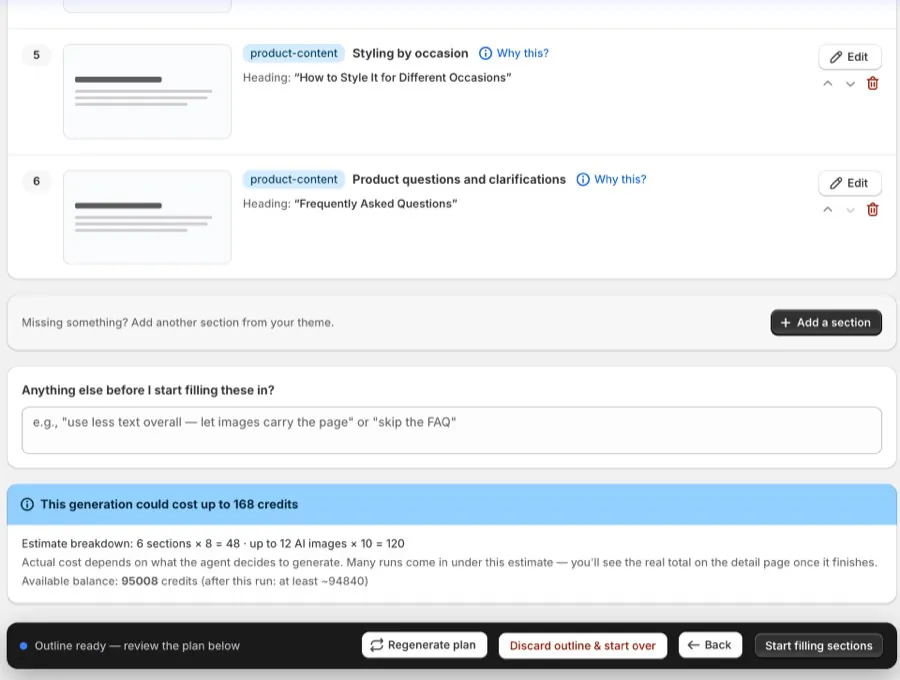
Every row carries a “Why this?” you can open · the estimate breaks down as sections × 8 + images × 10 · your balance is shown before you commit
One writer. Not six.
Most systems write each section in its own isolated call. Those calls can’t see each other, so they repeat the same phrase, stuff the same keyword into every heading, and pad. ObsessAI writes the entire page in a single pass, so it can edit itself for brevity and repetition the way a human writer would on a second read.
Section-by-section (the common approach)
Six calls that can’t see each other
- Editorial words on the page
- 1,219
- Repetition ratio
- 0.113
- One phrase restated
- 8× across 3 sections
- Same keyword in headings
- 4 of 6
ObsessAI — one holistic pass
One call that holds the whole page
- Editorial words on the page
- 303
- Repetition ratio
- 0.04
- One phrase restated
- —
- Same keyword in headings
- —
- measured on the same collection, same dossier, same theme — our own benchmark
The model never touches a URL.
Image placement is deterministic. The plan decides how many images a page needs from your approved outline and your theme’s own schema — no model call — and the images are injected into the template afterwards. Two things follow from that: the model cannot drop, swap or hallucinate a product photo, and the number quoted on the outline is exactly the number you’re charged for.
- Your photos are the ground truth — generated scenes compose around them; the product stays as photographed
- The quote and the charge read the same function — “up to 4 images” means at most 4 images billed
- Failed items are refunded — you don’t pay for an image that didn’t land
| What decides it | Who | Cost |
|---|---|---|
| How many images the page needsfrom the approved outline + your theme’s schema | Deterministic | no model |
| Which of your photos to useyour selection, out of your catalog | You | — |
| The scene around the productcomposed inside your brand backgrounds | Model | 10 cr |
| Where each image lands in the templateinjected after composition, then verified | Deterministic | no model |
Three ways it can reach your storefront.
Most merchants never think about this — the default just works. It matters if you have opinions about what may write to your theme.
Default
Theme native
A per-collection template whose sections are real native section instances. Shopify renders it the way it renders everything else.
- Live prices and inventory
- Editable in the theme editor
- Yours if you uninstall
Alternative
Theme API approved
The compiled renderer and template are written to your theme via Shopify’s Theme API, under an exemption Shopify approved in June 2026.
- Zero merchant setup
- No app blocks to place
- Shopify renders the payload
For strict shops
App block
The page is pre-rendered and stored in a metafield, then output through a thin theme app extension. Nothing is written to your theme files.
- No theme-file writes at all
- Fallback delivery
- Same page, different plumbing
Change it in plain words.
Every section has a conversation attached. Ask for what you want — warmer, shorter, a different photo, drop the FAQ — and it re-composes that section only, shows you the preview, and tells you what it cost. Nothing republishes until you say so.
- Per-section, not whole-page — refining one band doesn’t re-roll the rest
- Priced like everything else — 8 credits per refinement, quoted before it runs
- Reversible — roll back to any previous version of the page
Warmer tone, less text — let the image carry it. And use the lifestyle photo instead of the studio shot.
- rewrote hero copy
- swapped in the lifestyle photo
- re-composed the section
Done — the preview is updated on your storefront. Publish, or keep tweaking?
Priced by the piece. Quoted first.
A collection page is the sum of its parts. You see the total on the outline screen, against your balance, before anything runs.
Page section
8 creditsEach composed section — copy written into your theme’s own fieldsGenerated image
10 creditsComposed around your approved product photoRefinement
8 creditsRe-composing one section after a chat instructionVideo
100 creditsOptional — a short clip for a hero band
A typical seven-section page with four images is 96 credits — inside the free trial’s 100. That figure is arithmetic on the four prices above (7 × 8 + 4 × 10), not an average of real runs: the pages merchants actually approve vary in both counts, and your own total is quoted on the outline screen before anything runs.
The honest answers.
Does it work with my theme?
It doesn’t keep a list of supported themes. It opens your theme’s section files and reads what each section is actually built to hold, then composes with those. That’s why the outline can tell you a specific section is a poor fit before you spend anything.
What if I run it twice?
The same brief produces the same shape of page — the section sequence is planned deterministically from your theme and your brief. Only the content varies with the collection.
Can it invent things about my products?
Copy is written from your catalog data. Imagery composes around photos you approve, and the model never handles the image files — placement is deterministic and verified afterwards.
What happens to the page if I uninstall?
On the default delivery it’s a normal template in your theme. It stays, and it keeps working.
Can I undo it?
Yes — roll back to any previous version, or unpublish entirely. Nothing goes live without you publishing it.
Your busiest collection
deserves a real page.
first page in your free trial · preview before anything goes live