no new shoot · no videographer · you approve every still before motion is billed
A photo in, a finished reel out — vertical 9:16, voiced, scored, captioned and labeled. One product shot is the whole brief.
Five formats, and it picks the right one — a garment gets a try-on, a candle gets a voiceover. You can override it.
Your product stays exactly as photographed — a vision gate checks every generated still against the real product before it is allowed to move.
You approve the stills before motion is billed — the expensive half of the job doesn’t start until you say so.
Every reel carries its provenance — the machine-readable AI tag is written into the file on every render, and a visible label rides on the caption track.
bezza · AI-generated · provenance embedded
what you supplyone photo you already have→what comes back
AI-generated
18 seconds · 4 beats · 9:16
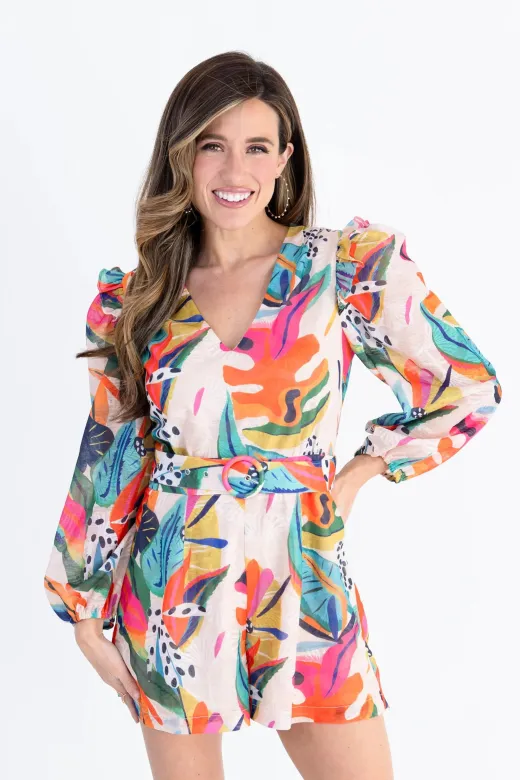
A real reel from a real store — Bezza. Four beats, one source photograph. Nothing was filmed.
How it works
Five stages. You stand in the middle of them.
The reel is planned, voiced and shot as stills before a single frame of motion is rendered — because motion is where the money goes, and a still you can reject costs almost nothing.
01
Plan the shots
A director writes the beats: what’s said, how long it runs, how each one is framed.
02
Voice it
The script is spoken with word-level timing, so captions land on the syllable.
03
Shoot the stills
Your product, composed into each scene — then checked against the original photo.
04
You approve
See every still before motion begins. Regenerate any of them. Then it runs.
Merchant gate
05
Move and finish
Stills animate, audio is laid, captions burn in, provenance is stamped into the file.
stopping at the approval gate is a pause, not a failure — nothing you didn’t approve was ever charged
The fidelity gate
It has to still be your product.
Generative video’s oldest failure is quiet: the model produces something beautiful that is no longer the thing you sell. A sleeve grows a cuff. A print rearranges itself. The buyer orders what they saw and receives something else.
So every generated still is put back in front of a vision model with the original catalog photo, and asked one question: is this the same garment? A still that fails is regenerated, not shipped — and the check runs before the still is allowed to become motion, which is the only point at which fixing it is cheap.
Checked against your photo — not against a description of it
Failures regenerate — you see the pass, not the attempt
Run before motion — the expensive stage never inherits a bad still
stills, before you approve them
neck-downfidelity check passed
from behindfidelity check passed
Two of the four stills from the reel above. Each one is the store’s own product photo, re-composed — and each one had to pass the check before it moved.
Three catalogs
A dress, a grinder, a snowboard.
The hardest question about a tool like this is whether it works for what you happen to sell. These are three real outputs from three unrelated catalogs — no shared template, no shared scene, no shared presenter. The only thing they have in common is that nobody filmed anything.
a fashion boutique
AI-generated
A printed romper, worn18s · 4 beats · try-on
a coffee equipment retailer
AI-generated
A hand grinder, in use22s · product in hand · Swedish
our own demo store
AI-generated
A snowboard, on the hill13s · product in scene
Left to right: Bezza, Barista och Espresso, and our own demo store. Different products, different countries, different languages — the middle one speaks Swedish because its store does.
Five formats
A dress and a candle are not the same ad.
The format is chosen from what the product actually is — a vision check on your photo decides whether it can be worn at all. You can always pick one yourself.
Try-on showcase
Worn, not held
A hook, the product on a body in motion, a close.
Apparel and wearables
3–5 beats
Creator sandwich
The talking-head ad
A presenter opens and closes; the product fills the middle.
Any product
3–5 beats
Voiceover b-roll
Nobody on camera
The voice carries the hook and the call to action; the product carries the frame.
No presenter needed
3–5 beats
One-take native
One continuous take
A single unbroken shot that reads as a real post, not an ad.
Under 14 seconds spoken
1 beat
Transition
Music, no voice
Outfit cuts on the beat with short on-screen captions. Nothing is spoken.
Looks and styling
2–4 beats
Where it happens
Twenty places you never have to travel to.
A reel shot in one room looks like a reel shot in one room. So a shot lands in a chosen environment — and when a reel’s beats describe different moments, each beat gets its own, rather than three near-identical bedroom mirrors in a row.
Café
Home living room
City street
Boutique
Creator studio
Kitchen
Bedroom
Home office
Vanity
Gym
Yoga studio
Rooftop terrace
Garden patio
Beach
Salon
Bookstore
Industrial loft
Dining nook
Spa
Market
Or use your own. Upload your studio, your shopfront, your actual backdrop, and your product is composed into that instead. Either way the product stays exactly as photographed — the scene changes around it, never the thing you sell.
Framing
Whether a face appears is a product decision.
Most try-on shots don’t need one. A dress, a coat, a pair of jeans reads perfectly from the neck down — so that’s the default, and no face is generated at all.
Some products invert that rule. Sunglasses, earrings, hats, makeup — hiding the face hides the product. So the planner classifies where the product is worn and frames accordingly, rather than following a fixed list of categories.
Framing
Face
Used for
Neck-downthe garment fills the frame
Not shown
default
From behindthe back of the outfit
Not shown
movement
Mirror, at distancefull-body, phone raised
Not shown
full look
Head and shouldersthe only framing that shows a face
Shown
face-worn
What it costs
Priced by the second. Quoted per beat.
You choose the length before it runs, and the length is the price. Each beat is charged as it renders — so a job that stops at the approval gate has only spent what it rendered.
Standard
10 credits / secondThe everyday tier — most reels, most catalogs
Premium
20 credits / secondHigher-fidelity motion for hero products and paid placements
A failed shot
refundedOne free retry; if a shot can’t be delivered, every beat charged on that run is returned
The reel at the top of this page
Beat 1 · hook · 4s
80 cr
Beat 2 · b-roll · 5s
100 cr
Beat 3 · b-roll · 5s
100 cr
Beat 4 · close · 4s
80 cr
18 seconds, premium
360 cr
a real job on a real store · the quote was the invoice
Labeling
Every reel says what it is.
AI-generated marketing video is a disclosure obligation in a growing number of places, and platforms are beginning to read that disclosure from the file rather than take a poster’s word for it. So the label is applied in two layers, and neither is optional.
Machine-readable provenance on every render — the tag platforms and tooling read, written into the file whether or not you asked for it
A visible label burned into the picture — carried on the caption track, so it rides with the video through a re-upload
Disclosure is not an afterthought — it is applied at the moment the file is finished, not bolted on at publishing time
On the file
Applied
Optional?
Visible labelburned into the picture, so a re-upload can’t strip it
With captions on
yes
Machine-readable tagthe tag platforms and tooling read, written on every render
Always
no
Musicgenerated for the reel, not licensed from a catalog
Cleared beds
—
The music is generated, not licensed. There is no third-party track on your reel to be claimed, muted or taken down.
Before you ask
The honest answers.
Do I need to film anything?
No. The product photos already in your Shopify catalog are the source material. If you have better photography, you can use that instead — but you don’t need a camera, a studio or a model.
Will it invent a product that doesn’t exist?
That’s what the fidelity gate is for. Every generated still is compared back to your real product photo and regenerated if it has drifted. It is a check, not a promise — which is exactly why you see the stills and approve them before anything is animated.
Does a person have to appear in my reels?
No. Two of the five formats never put anyone on camera, and the try-on framings are faceless by default. A face only appears when the product is worn on the face.
What language does it speak?
Your store’s. The script is written in your shop’s language rather than written in English and translated afterwards.
Can I edit the script?
You approve the plan before it runs, and you can regenerate any shot you don’t like. What you can’t do is hand-write every word — this is a producer, not a text editor.