How to Make an AI Commercial for Your Product: A Practical Walkthrough
An AI commercial is a short video ad generated from your product photos, a script, and a presenter (real or synthetic). This walkthrough covers the brief, the three styles worth knowing, why reference photos matter more than prompts, script structure for 15 and 30 seconds, disclosure rules, a QA checklist, and the platform specs for YouTube, TikTok, and Google Ads.
Key takeaways
- An AI commercial is built from three inputs: your real product photos, a short script, and a presenter. The quality of the first input decides everything; the model can only reconstruct what your photos show.
- Write the brief before touching any tool: one product, one claim, one call to action, and the platform it runs on. Vertical 9:16 for TikTok and Shorts, horizontal 16:9 for YouTube in-stream, and the aspect ratio changes how every shot is framed.
- A 15-second ad is hook, proof, call to action. A 30-second ad adds one objection handled. Anything longer needs a reason.
- If a synthetic presenter says something that reads as a customer experience, that is an endorsement under FTC guidance and it has to be truthful and, where the connection is not obvious, disclosed. Founder on camera, or a clearly presenter-style voice, avoids the problem.
- Check the finished cut against the product photo, not against your memory: colors, logo placement, hardware, and any text on the product must match. Then check it with the sound off, because most feed video is watched muted.
What "AI commercial" means in 2026
The phrase covers three quite different things, and picking the wrong one is the most common way a first attempt disappoints.
The first is the presenter ad: a person, real or synthetic, talks to camera about the product. The second is the product-motion ad: no person at all, the product itself is filmed, lit, and moved through a scene, the way a car or a perfume commercial works. The third is the UGC-style ad: shot to look like a customer made it on a phone, casual framing, spoken-word delivery, often subtitled.
All three are now producible from a set of product photos and a script. Which one you want depends on the product and the platform, and that is the first decision in the brief, not the last.
Step one: the brief
Write it down before opening any tool. Four lines.
One product. Not the collection, not the brand. A single SKU with a name.
One claim. The single thing the ad asserts. "Dries in ten minutes." "Fits under a jacket." "Made from one piece of brass." If you have three claims, you have three ads.
One call to action. Shop now, see the collection, use the code. Pick one and put it on the end card.
The platform. This is the line people skip and regret. TikTok and YouTube Shorts want vertical 9:16 with safe zones for the interface overlay. YouTube in-stream wants 16:9. Google's and TikTok's specifications are public and precise about resolution, aspect ratio, and duration. The aspect ratio changes how every shot is framed, so an ad made for one and cropped to the other always looks like what it is.
Step two: pick the style for the product, not the trend
Product-motion suits anything with a physical presence that photographs well in motion: furniture, lighting, cosmetics, drinkware, footwear. It has the fewest trust problems because nobody is saying anything.
Presenter ads suit products that need explaining or reassurance: skincare with a routine, a garment where fit matters, anything with a story. If a face helps, the founder's face helps most, and it costs nothing but nerve.
UGC-style suits products people already talk about socially: fashion, snacks, gadgets. It is the style most tempting to fake and the one where faking it carries real risk, which the disclosure section below covers.
Step three: reference photos beat prompts
This is the part that decides whether the ad is usable.
An AI video model builds the product from the images you give it. If you give it one front-facing photo, it has to imagine the sides and back, and it will, plausibly and wrong. The hardware changes. A logo migrates. A second pocket appears. In a still image these inventions are catchable; in twelve seconds of video with the product turning, they slide past.
So the working rule is: the model may only reconstruct what your photos show, and you feed it enough photos that reconstruction covers every angle the script asks for. Front, back, side, a detail of any hardware or text, and the product in use if the script shows it in use. Our own studio at Obsess AI is built around this constraint; its director asks for the missing angle rather than inventing it, and it refuses to render a shot it cannot support from the references. Whatever tool you use, adopt the same discipline yourself: no angle in the script that is not in the reference set.
Reference photos also set the visual truth for color. Brand colors drift in generation. Give the model a photo where the product color is correct and neutral-lit, and check the output against that photo, not against your memory of the product.
Step four: the script
Fifteen seconds is three beats. The hook, in the first two seconds, is a visual or a line that stops the scroll: the product doing the one thing the claim is about. The proof is the middle: show the claim being true, not a sentence saying it is true. The call to action is the last three seconds, spoken and on screen.
Thirty seconds adds one beat: the objection. "Too delicate for every day?" cut to the product being worn on a commute. One objection, handled visually, then the call to action.
Write the spoken lines short enough to read at conversation pace with room to breathe, because a synthetic voice that races is the fastest way to signal "made by a machine." Ten to twelve words per line is plenty. Read it aloud with a stopwatch before you generate anything.
Step five: the presenter and the disclosure question
If the ad has a person in it, decide what that person is.
A founder on camera is the strongest option and the simplest legally. You are who you say you are.
A presenter-style synthetic voice delivering product facts ("this bag fits a 14-inch laptop") is fine. Nobody is pretending to be a customer.
A synthetic presenter delivering lines that read as a customer experience ("I have worn this every day for a year and it still looks new") is where the trouble starts. Under the FTC's Endorsement Guides, an endorsement has to reflect the honest opinion of the endorser and material connections have to be disclosed. A presenter who does not exist cannot have an honest opinion about a year of wear. Do not script testimonials for synthetic people. If you want customer voices, use real customers and label them.
The practical version of this rule: write presenter lines in the second person about the product, never in the first person about an experience.
Step six: text, captions, and the end card
Most feed video plays muted. Assume the sound is off and design for it.
On-screen text should carry the claim and the call to action on its own. Captions should match the spoken lines exactly; auto-captions with errors read as careless. The end card is the frame that does the selling: logo, product name, the offer if there is one, and the call to action, held for at least two seconds so it can actually be read.
Tools differ here in a way that matters for iteration. Some bake the text into the video at render time, so changing a word means regenerating the whole ad. Others keep the words as a separate layer over the finished footage, so you can restyle the headline or swap the offer without paying for another render. Ours works the second way, and if you plan to run seasonal variations of the same ad it is worth checking which kind you are using before you commit.
Step seven: the quality check
Before the ad goes anywhere near a campaign, put the finished cut beside your reference photos and check five things.
Product fidelity: color, logo position, hardware, stitching or seams, any text printed on the product. This is where invented details hide.
Brand colors: the end card and any text overlays use your actual palette, not the model's approximation of it.
Motion: nothing morphs. Watch the product edges frame by frame at any point where it moves or turns.
Sound off: mute it and watch. Does the claim land? Is the call to action readable?
Specs: the file matches the platform's published requirements for aspect ratio, resolution, length, and file size. Both YouTube and TikTok reject or degrade non-conforming uploads, and Google Ads video specifications are equally specific.
How to make it in Obsess AI, step by step
Everything above is tool-agnostic. This is what the same job looks like inside our Creative Studio, on the Videos tab, with screenshots from a real run on September 4, 2026. The product is a crochet-lace rattan crossbody bag from a fashion store on our platform. The whole run took about eight minutes and the credits it spent are on the screen at each step.
Before the first click, the studio states three rules it will hold to: every shot is rebuilt from the product's own photos and nothing the camera cannot see is invented; the script becomes exact stills that you approve before anything renders; and a scriptwriter works beside you in a panel on the right. The five steps below follow that order.
Step 1. The star
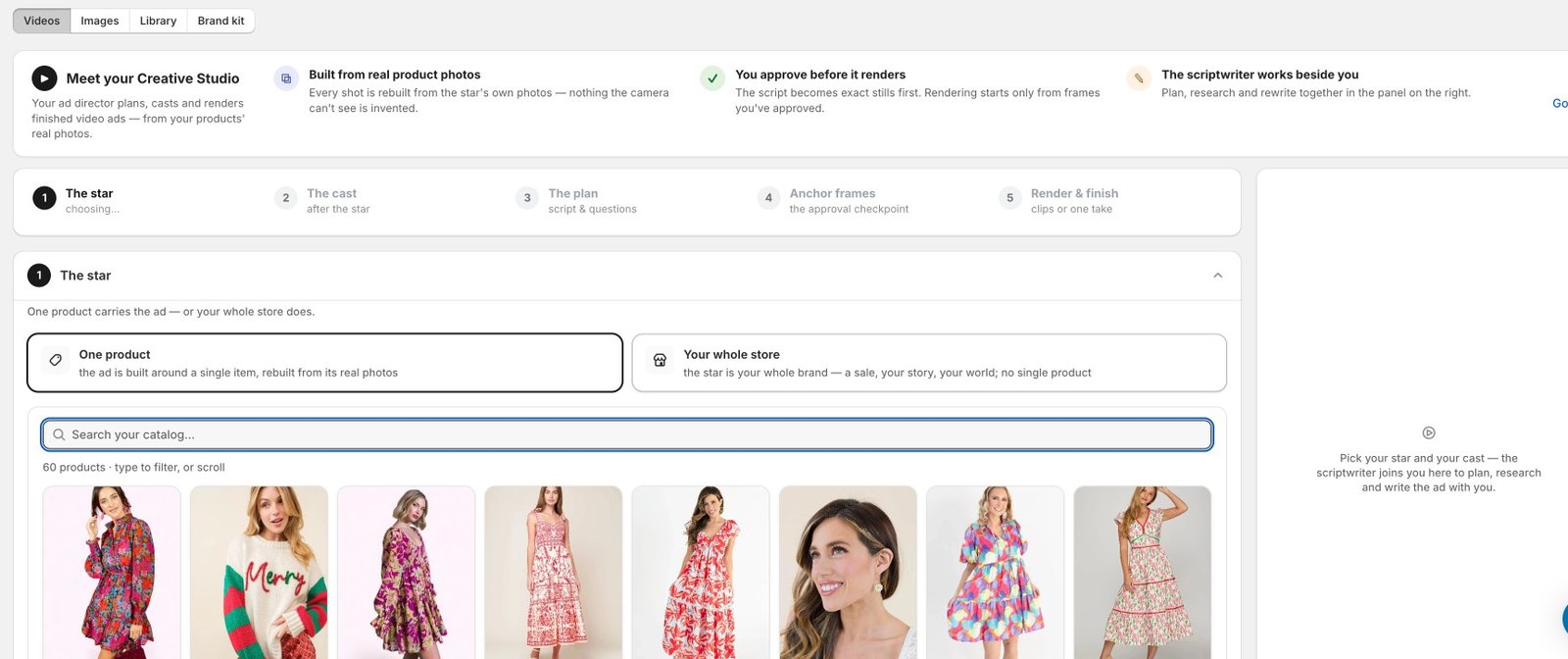
Choose one product, or your whole store. A single product is rebuilt from its real photos; the whole-store option is for a sale, a story or a brand film with no single hero. The catalogue grid tells you how many reference photos each product has, and flags a thin set, because the number of angles you have is the number of angles the ad can show honestly. We picked a bag with eight photos.
Step 2. The cast
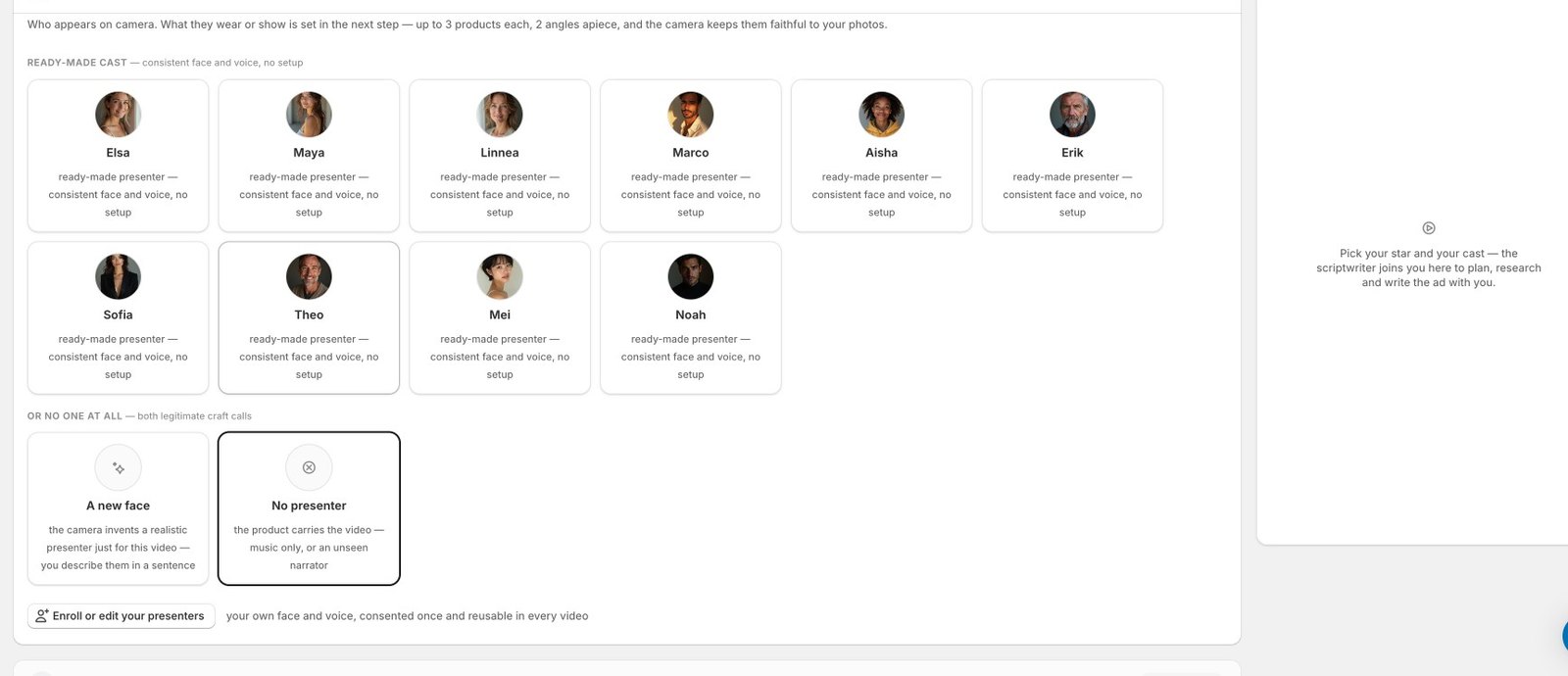
Who appears on camera. Four kinds of answer. Your own people: a founder or team member enrolled once, with their real face and real voice, verified in every frame. A ready-made presenter: ten of them, each with a consistent face and voice and no setup. A new face the camera invents from a one-sentence description, which is fine for a single ad and wrong for a series, for the reasons in the Seedance guide. Or no presenter: the product carries the video with music or an unseen narrator. We picked Maya from the ready-made cast.
Step 3. The plan
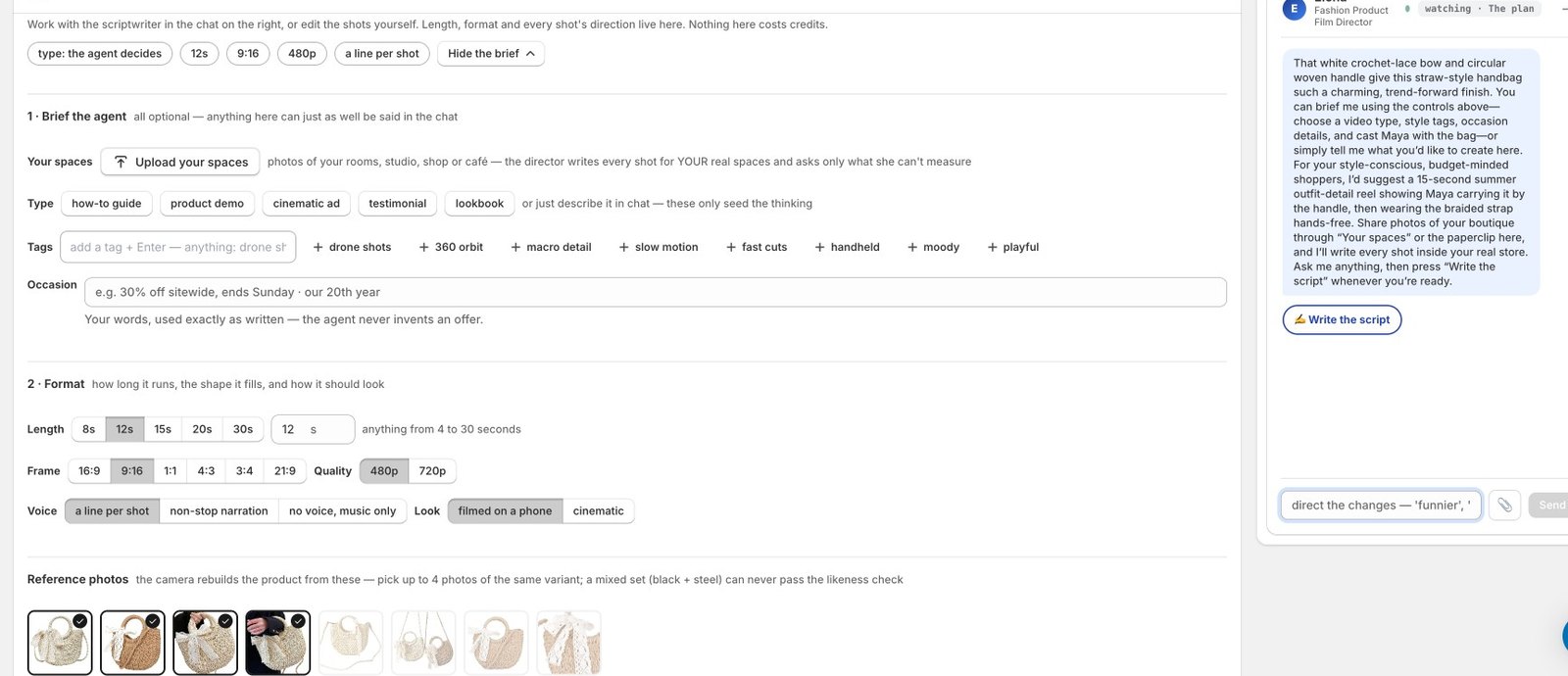
Nothing on this step costs credits. The brief is optional: a type (how-to, product demo, cinematic ad, testimonial, lookbook), a few tags, and the occasion in your own words. The occasion line is used exactly as written; the agent never invents an offer. We typed "New fall arrivals, 20% off this week". The format is length from 4 to 30 seconds, frame from 16:9 to 21:9, 480p or 720p, a voice mode, and a look. Then you pick up to four reference photos of the same variant, because a mixed set of two colourways can never pass the likeness check.
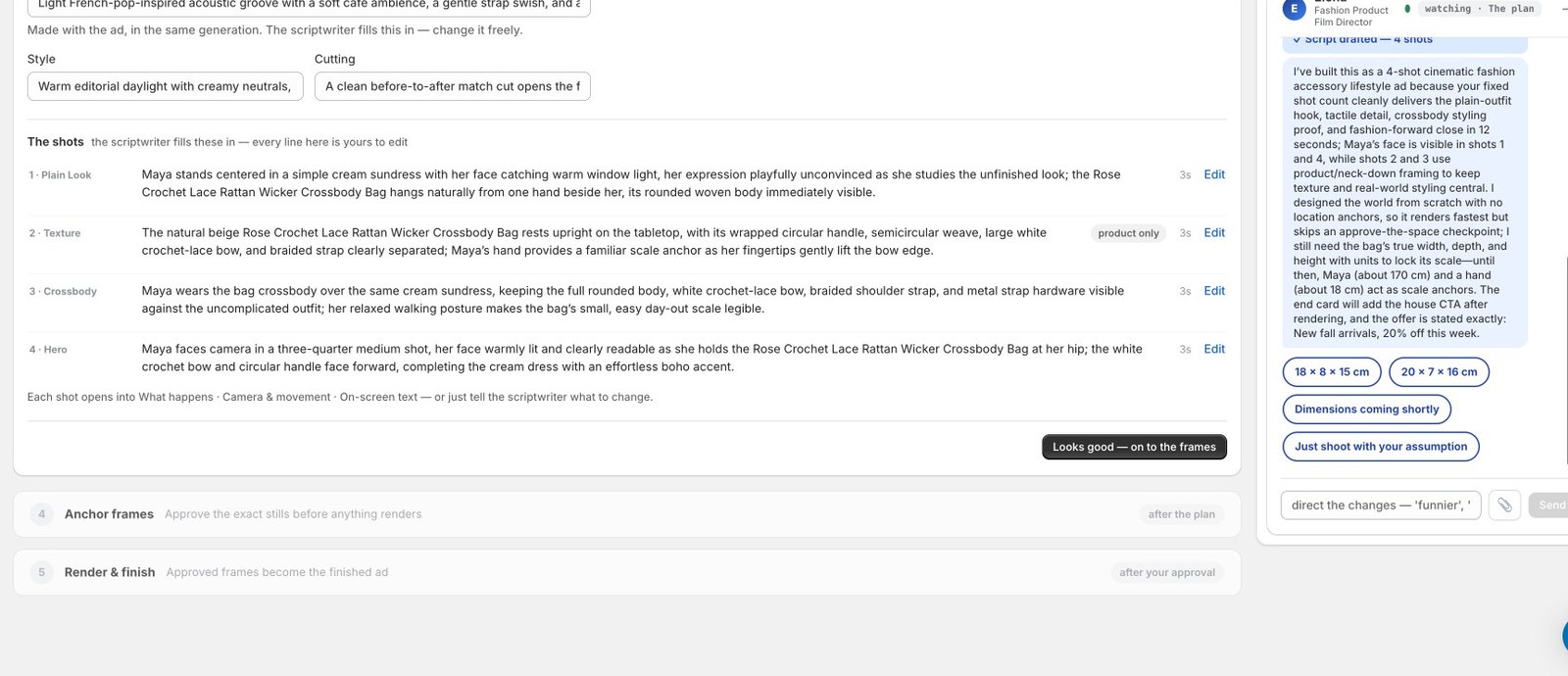
Press "Plan the script" and the scriptwriter thinks out loud in the panel, then fills in the shots. Ours came back in about forty seconds as four shots of three seconds each: a plain-look hook, a texture close-up marked product only, a crossbody styling shot, and a hero close. It also wrote the soundtrack, style and cutting notes, and explained in the chat why it built the ad that way. Then it asked one question it could not answer from the photos: the bag's real dimensions, offering two guesses and a "just shoot with your assumption" option, because scale is the thing a camera cannot measure from a picture. Every line is editable, or you tell the scriptwriter what to change.
Step 4. Anchor frames
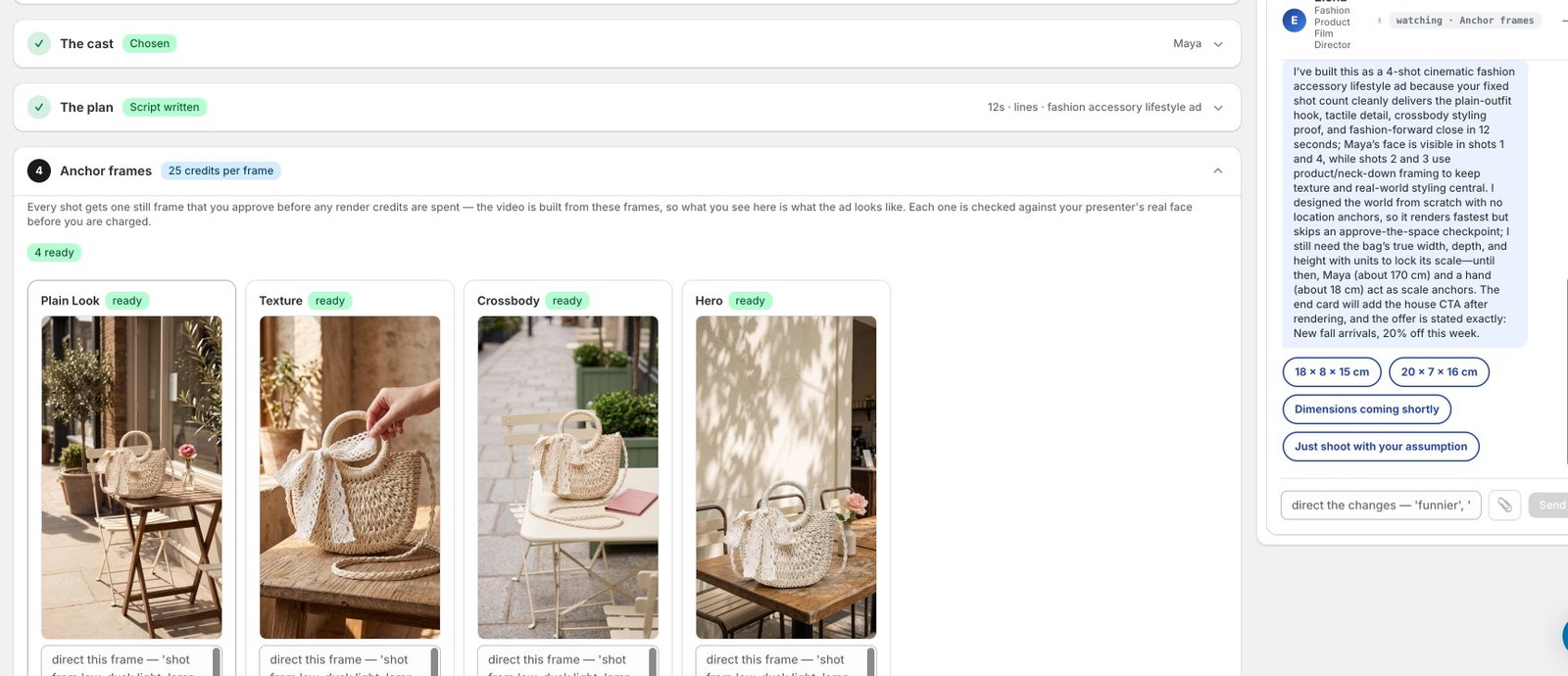
This is the approval checkpoint, and the reason the finished ad looks like your product. Every shot gets one still frame, at 25 credits each, and you approve them before any render credits are spent. The video is built from these frames, so what you see is what the ad looks like. You can redirect a frame in a sentence ("shoot from low, dusk light"), regenerate it, or upload your own photo of your own space instead. There is also a one-frame mode, where shot one is the world and the video stages the rest inside it, and a no-frames mode for speed. Our four frames took about a minute and held the bag's weave, bow and handle exactly.
Step 5. Render and finish
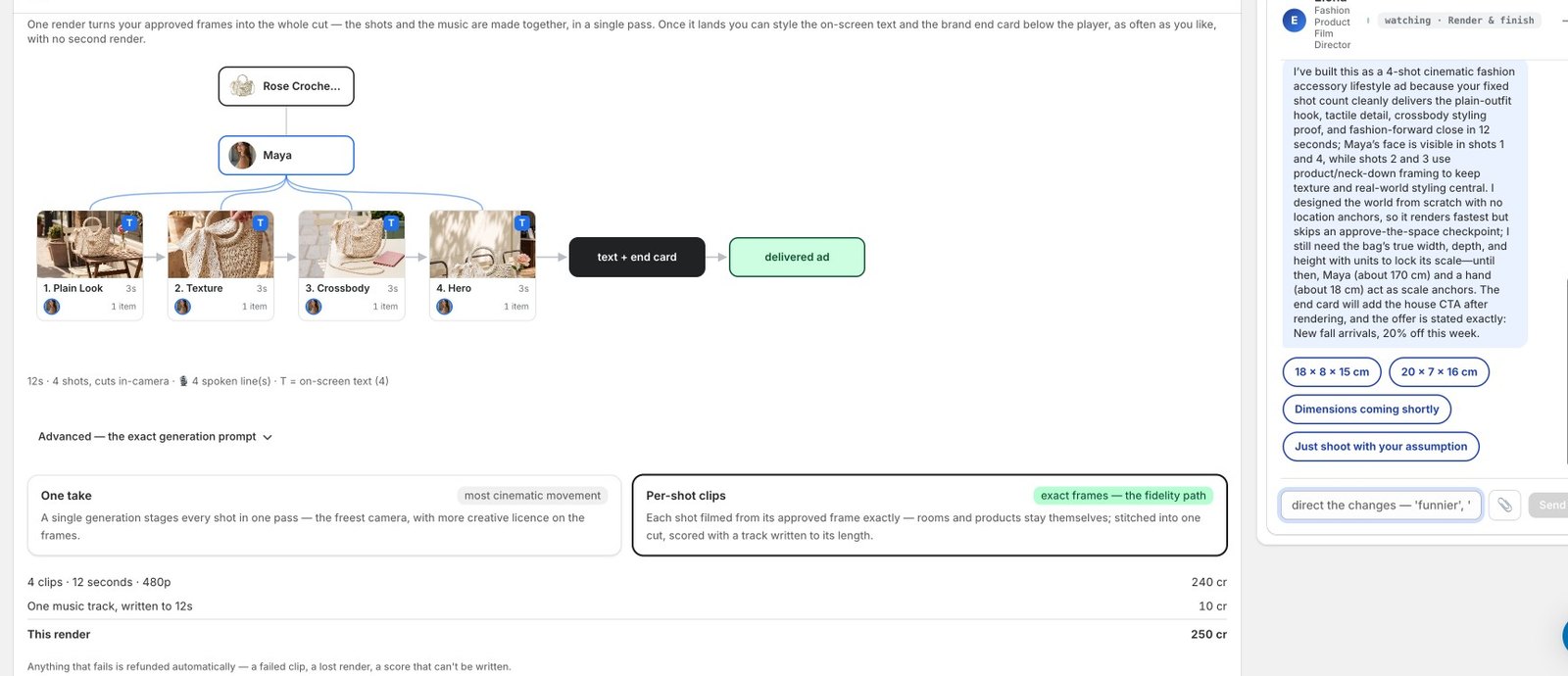
One render turns the approved frames into the whole cut, with the music written to its length in the same pass. Two ways to do it: one take, where a single generation stages every shot with the freest camera, or per-shot clips, where each shot is filmed from its approved frame exactly and the clips are stitched, which is the fidelity path and the default. The price sits on the button before you press it. For our 12-second, four-clip, 480p ad it read 250 credits: 240 for the clips and 10 for the track. Anything that fails is refunded automatically.
The result
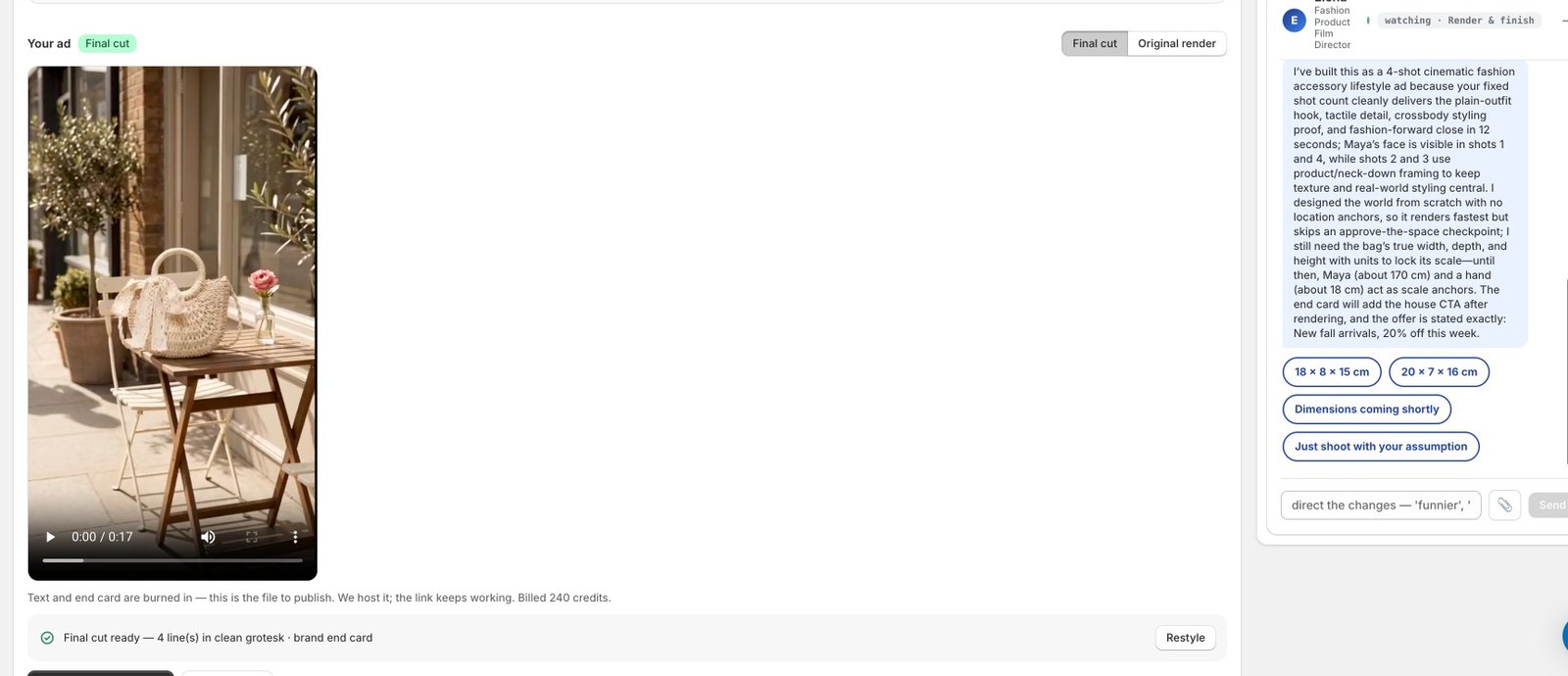
The render took just under seven minutes. When it landed, the studio showed the final cut with four lines of on-screen text and the brand end card already burned in, a toggle back to the original render, a Restyle button for the words, and two exits: Done, which files the ad in the Library, or Edit the ad, which reopens the plan and re-stages only the shots you change. The line under the player says what was billed: 240 credits for the render, with the 10-credit music track on the same receipt. The ad is hosted at a link that keeps working, so it can go straight into a campaign.
Here is the cut, exactly as delivered, with the offer line from the brief used word for word:
Two honest notes from this run. The bag held in every shot: the weave, the lace bow, the braided strap and the ring handle match the reference photos, which is the whole point of the anchor-frame checkpoint. And the four stills came back product-only even though the plan cast Maya in three of them; she was staged correctly at render time, but the stills should have shown her, and we have logged that. The checkpoint exists so that you see what will render, and on this run it showed less than it should have.
Total spend for the run: 100 credits for the four anchor frames, 240 for the render, 10 for the track. Nothing on the plan step cost anything, and the scriptwriter's rewrites are free until you press render.
Where to run it
Start narrow. One platform, one placement, one audience, for a week. Compare the AI commercial against whatever you were running before on the same placement, because the question is not "is this a good ad" but "is this a better ad than what I had." If the product-motion version outperforms the presenter version, you have learned something about your product that applies to every ad after it.
Then make the next one. The reason AI commercials change the game for a small store is not that any single ad is cheaper, though it is. It is that you can afford to make the third and fourth version, and the fourth version is usually the one that works.
Frequently Asked Questions
How long should an AI commercial be?
Fifteen seconds for feed placements and Shorts, thirty for YouTube in-stream where the first five seconds decide whether it gets skipped. Both YouTube and TikTok document their format lengths and specs; the honest rule is that every extra second has to earn its place. Most product ads that run long are padding a thin brief, not telling a longer story.
Do I need actors for an AI commercial?
No. You have three options: a synthetic presenter from a library, a product-only cinematic ad with no person at all, or you on camera as the founder. Product-only ads sidestep the trust and disclosure questions entirely and suit most physical products. A founder presenter is the most credible option when a face helps. Library presenters work, but be careful that they do not deliver lines that imply a customer experience they did not have.
Is it legal to make an ad with an AI presenter?
Making one is legal. The constraints are the same as any advertising: claims must be truthful and substantiated, and anything presented as an endorsement or a customer experience falls under the FTC Endorsement Guides, which require the endorsement to reflect honest opinions and material connections to be disclosed. A synthetic presenter reading a scripted testimonial as if it were a real customer is the risky pattern. Presenter-style delivery of product facts is not.
Can an AI video ad generator make a commercial for free?
Many tools offer a free tier that produces watermarked or low-resolution output, which is useful for testing a script and pacing but not for running paid media. Production-quality output, in the resolution and length the platforms want, is generally metered. Budget for the finished ad, and use free tiers to kill bad scripts early.
Related Articles
Keep exploring
Go deeper on the topics in this article with related guides, free tools, industry playbooks, and competitor comparisons.
Related guides
Free tools
How we compare
Sources & references
Primary documentation referenced for the technical claims on this page. We do not link out to competitor products or affiliate content; these are the standards bodies and platform docs the guidance is built against.
- YouTube Help: Video ad formats ↗The official description of skippable and non-skippable in-stream, in-feed, bumper, and Shorts ad formats and their length rules.
- Google Ads Help: Video ad specifications ↗Technical requirements for video assets in Google Ads campaigns, including aspect ratios and resolution.
- TikTok for Business: Video ads specifications ↗Aspect ratio, resolution, duration, file size, and safe-zone requirements for TikTok in-feed video ads.
- Federal Trade Commission: Endorsement Guides, what people are asking ↗The FTC guidance on endorsements and testimonials in advertising, including disclosure of material connections and the requirement that endorsements reflect honest opinions.
Ready to Automate Your Content Marketing?
Let Obsess AI write SEO-optimized blog posts for your Shopify store.